ADATA ADATA Premier 256GB MicroSDXC UHS-I Class 10 Memory Card Memory card · 256GB · microSD In stock· Online only
£41.99inc VAT£46.98 delivered
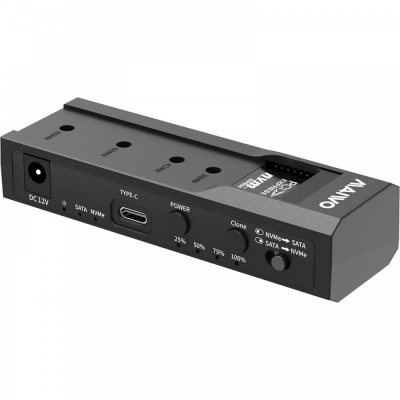
Maiwo USB Type-C, Dual Bay HDD/NVMe M2 SSD 10Gbps Clone Converter For 2.5" and 3.5" SATA, Clone SATA to NVMe Instantly
+ £4.99 tracked delivery · £47.98 delivered Free delivery on orders over £150. One delivery charge per order.
In stock
Next-day delivery when you order by 3pm, Monday to Friday. Orders after 3pm Friday, or at the weekend, arrive on Tuesday. Not on bank holidays.
Limit of one of each item per order. Need more? Call us on 0161 820 1992.
4.9 on Google · 14-day returns · 0161 820 1992
From the manufacturer's information.
| Type | Drive enclosure |
|---|---|
| Connection | USB-C |
| HD Size | 2.5 & 3.5 |
| Internal Connection | SATA III |
| External Connection | USB Type - C |
In stock now and chosen to go with this part.
This description is supplied by Maiwo. Where it says "we" or "our", that means Maiwo, not Manchester PC.
MAIWO K10635N type C 10Gbps to dual bay HDD/NVMe M2 SSD clone converter for 2.5" and 3.5" SATA
Screw-less design easy to install HDD and SSD
Compatible for different kinds of HDD/SSD in the market, including M-key NVMe SSD,2.5" SATA HDD/SSD and 3.5" SATA HDD, can recognize two disks simultaneously when connecting with PC
Support M-key NVMe SSD
Offline clone, dual way, can copy 2.5"/3.5" SATA => NVMe or NVMe => 2.5"/3.5" SATA, switch to control source and target disk
Four LED lights indicate clone progress 25%,50%,75% and 100%
Interface: Type C to SATA/M-key M2
Support SSD size: 2230,2242,2260 ,2280
USB speed to 10Gbps max
Support U.A.S.P, will improve speed 30% at win8 or above
Compatible with windows, MAC and Linux
Unit size:108 x 35 x 24 mm
Easily migrating an OS from an old SATA HDD to a modern, fast M.2 NVMe SSD.
Accessing data from different drive types without needing multiple specialized adapters.
Managing large libraries of media files across different storage mediums at high speed.
Light Flashes when read & write, light goes off when in sleep mode.
Light flashes when cloning, light up when cloning is finished.
Insert 2.5"/3.5" SATA drive into the SATA Port, or insert M.2 NVMe SSD into the M2 port.
Spin the silicone cork to fix the M.2 hard drive.
Connect the adapter to your device via data cable.
Connect the power adapter and open the power switch.
Choose the clone mode
Make sure the capacity of the target drive is larger than or equal to the source drive
Connect the power adapter, open the POWER switch, the power light, lights up and then the two Drive Indicators light up
Long-press Clone button for 5 seconds and the Clone Indicator flashes
Press Clone button within 5 seconds to enter clone mode
Corresponding progress indicators start to flash when cloning
Indicators are on once cloning is finished
You must remove the USB-C cable from the PC for the cloning process to work
Package Content:
1 x adapter
1 x cable
1 x power adapter
3 x screws
1 x manual
1 x warranty card
1 Year






Want suggestions based on what you look at? (stays in your browser, switch off any time).