The short answer
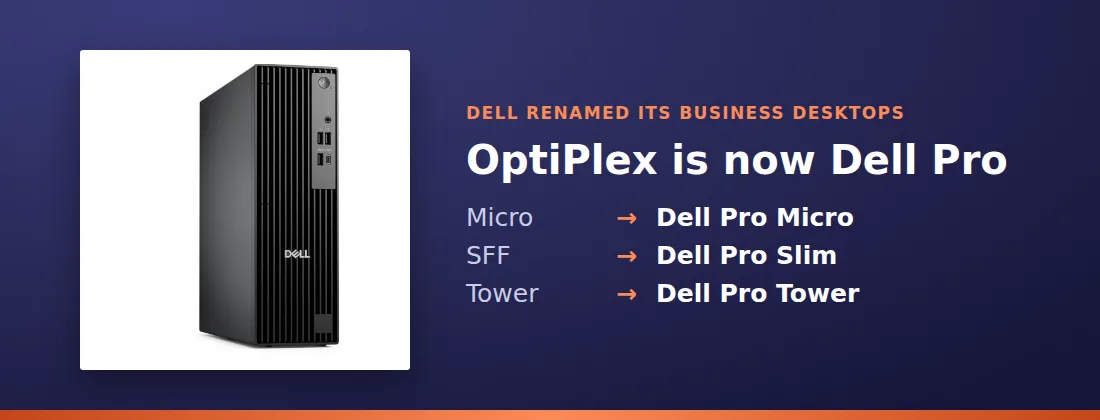
Dell stopped using the OptiPlex name in January 2025. Its business desktops are now called Dell Pro. The shapes are the same as before, with new names:
- OptiPlex Micro is now the Dell Pro Micro.
- OptiPlex Small Form Factor is now the Dell Pro Slim.
- OptiPlex Tower is now the Dell Pro Tower.
- OptiPlex All-in-One is now the Dell Pro 24 All-in-One.
Dell's UK OptiPlex page now says "OptiPlex desktops are no longer available" and that OptiPlex "will continue its legacy of intelligence and security under the Dell Pro product line". If you came here looking for a new OptiPlex, the Dell Pro of the same shape is the one you want.
The rest of this guide covers the details that trip people up: what the new model codes mean, the difference between Dell Pro, Pro Plus and Pro Essential, the two completely different PCs both called "OptiPlex 7010", and whether your current OptiPlex can run Windows 11 now Windows 10 support has ended.
What happened to Dell OptiPlex?
OptiPlex was Dell's office desktop for about 32 years, from 1993. At CES on 6 January 2025, Dell replaced its PC sub-brands with three families:
| Family | Who it's for | What it replaced |
|---|---|---|
| Dell | Home, school and everyday work | Inspiron, XPS |
| Dell Pro | Businesses and IT-managed offices | OptiPlex, Latitude, Vostro |
| Dell Pro Max | Maximum performance | Precision |
Dell's reason was simplicity. Its own research found buyers think of the machine simply as "a Dell" and choose on specification, size and price, so a different brand name for every range was getting in the way.
The new desktops went on sale in spring 2025 with Intel Core 14th Gen or Core Ultra (Series 2) processors, plus AMD Ryzen versions.
It has changed again since. Dell brought the XPS name back in January 2026, and in March 2026 it renamed its business laptops Dell Pro 3, 5 and 7 and brought Precision back as Dell Pro Precision. It also launched the first numbered desktop, the Dell Pro 5 Micro. OptiPlex has not come back. At the time of writing the Dell Pro Micro, Slim and Tower are still Dell's current business desktops in the UK.
Which Dell Pro replaces my OptiPlex?
Find the shape of your OptiPlex in the first column. The size and the job it does carry straight over.
| Your OptiPlex | Now called | Model code | Good to know |
|---|---|---|---|
| Micro (3000, 5000, 7000, 7010, 7020 Micro) | Dell Pro Micro | QCM1250 (AMD: QCM1255) | Fits behind a monitor. Uses lower-power "T" processors. No expansion cards. |
| Micro Plus | Dell Pro Micro Plus | QBM1250 | Core Ultra only. Optional Thunderbolt 4. |
| Small Form Factor (SFF) | Dell Pro Slim | QCS1250 (AMD: QCS1255) | The classic office box. Takes a low-profile card. Tool-less case. |
| SFF Plus | Dell Pro Slim Plus | QBS1250 | Four memory slots (up to 128GB) and three M.2 SSD slots. |
| Tower | Dell Pro Tower | QCT1250 (AMD: QCT1255) | Room for full-height cards and more drives. |
| Tower Plus | Dell Pro Tower Plus | QBT1250 | The most expandable. |
| OptiPlex 3000-class or Vostro desktop on a budget | Dell Pro Essential Slim or Tower | QVS1260, QVT1260 | Dell's cheaper business tier, launched late 2025. |
| All-in-One (e.g. 7420) | Dell Pro 24 All-in-One | QC24250, QC24251 | Plus version: QB24250. |
| OptiPlex Ultra (PC built into the monitor stand) | No direct replacement | n/a | The closest is a Dell Pro Micro on Dell's all-in-one stand. |
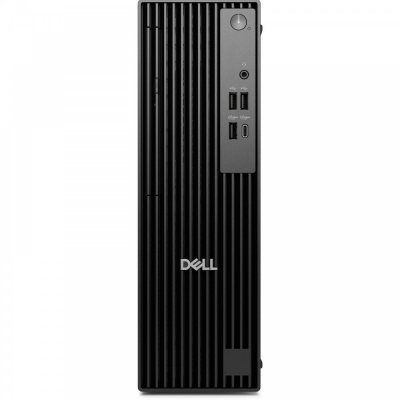
The Dell Pro Slim is the one most offices buy, and it's the one we currently stock: Dell Pro Slim QCS1250 with an Intel Core i5-14500, £644.99 with free delivery.
Shop desktop pcs (19 in stock)
How to read Dell Pro model codes (QCS1250, QCM1250 and so on)
Dell hasn't published an official key to these codes, but the pattern in its own product names is consistent. Take QCS1250:
| Part | Example | What it tells you |
|---|---|---|
| 1st letter | Q | A Dell Pro desktop (Dell Pro laptops start with P) |
| 2nd letter | C | The tier: V = Essential, C = standard Dell Pro, B = Plus |
| 3rd letter | S | The shape: M = Micro, S = Slim, T = Tower |
| The numbers | 1250 | Appear to follow the model year (25 for 2025, 26 for 2026) |
| Last digit | 0 or 5 | A code ending in 5 is the AMD Ryzen version |
So a QBM1250 is a Dell Pro Micro Plus, and a QVT1260 is a Dell Pro Essential Tower. The tier and shape letters are reliable. Treat the meaning of the numbers as a pattern, not something Dell has confirmed.
One more thing on the label: the regulatory model printed on the case (for example D19U on a Dell Pro Micro) is a different code. Use the model name or the service tag when you look up drivers or warranty on Dell's support site.
Dell Pro vs Dell Pro Plus vs Dell Pro Essential
| Dell Pro Essential (QV) | Dell Pro (QC) | Dell Pro Plus (QB) | |
|---|---|---|---|
| Shapes | Slim, Tower | Micro, Slim, Tower, 24" All-in-One | Micro, Slim, Tower, 24" All-in-One |
| Processors | Core 14th Gen, Core Ultra 5 and 7 | Core 14th Gen up to i7, Core Ultra (Series 2) up to Ultra 7, AMD Ryzen 8000 | Core Ultra (Series 2) up to Ultra 9 |
| Memory | Up to 64GB (2 slots) | Up to 64GB (2 slots) | Up to 128GB (4 slots on the Slim Plus) |
| Remote management (vPro) | Not advertised | On some configurations | On some configurations |
| Extras | Ubuntu option; graphics card option on the Tower | Graphics card option on the Slim | Thunderbolt 4 and fast network modules |
| Best for | Small offices and home offices on a budget | A typical office, the old OptiPlex buyer | Power users and anyone needing more expansion |
For most small businesses replacing an OptiPlex SFF, the standard Dell Pro Slim is the like-for-like choice. Essential saves money if you don't need vPro, and Plus is worth it only if you need the extra memory, drives or Thunderbolt.
What's actually new compared with the OptiPlex 7010 and 7020
| OptiPlex 7010 / 7020 (2023 to 2024) | Dell Pro (2025) | |
|---|---|---|
| Processors | 12th to 14th Gen Intel Core | 14th Gen Core or Core Ultra (Series 2); AMD Ryzen 8000 on "55" models |
| AI chip (NPU) | None | Core Ultra versions have a small NPU (up to 13 TOPS). Not enough for Copilot+ features, which need 40 TOPS or more |
| Memory | DDR4 or DDR5 depending on model | DDR5 throughout |
| Display outputs | Varied by model | HDMI 2.1 and DisplayPort 1.4a as standard, up to four screens |
| Front USB-C | Not on every model | Standard on the Micro and Slim |
| Noise | n/a | Dell says the Slim is up to 57% quieter than the model it replaces |
Two things to check on any Dell Pro before you buy:
- Wi-Fi isn't always fitted, especially on the Slim. It has a slot for a Wi-Fi card, but many office configurations leave it out because they're meant for a network cable. If you need Wi-Fi, check the specification or plan for a small USB or PCIe adapter.
- vPro isn't on every configuration. If your IT provider manages PCs remotely with vPro, confirm the exact processor and configuration.
Shop desktop pcs (19 in stock)
Two different "OptiPlex 7010s": which one have you got?
Dell reused some model numbers years apart, which causes a lot of confusion when people look up parts or ask about Windows 11:
| Name | Year | Processor | Memory | Windows 11? |
|---|---|---|---|---|
| OptiPlex 7010 | 2012 | 3rd Gen Core | DDR3 | No |
| OptiPlex 7010 | 2023 | 12th or 13th Gen Core | DDR4 (DDR5 on the Plus) | Yes |
| OptiPlex 7020 | 2014 | 4th Gen Core | DDR3 | No |
| OptiPlex 7020 | 2024 | 12th to 14th Gen Core | DDR5 | Yes |
To tell which you have, look at the processor in Settings › System › About, or enter the service tag (on a sticker on the case) on Dell's support site.
Windows 10 has ended: can your OptiPlex run Windows 11?
Windows 10 support ended on 14 October 2025. A Windows 10 PC still works, but it no longer gets security fixes unless it's enrolled in Microsoft's Extended Security Updates (ESU):
- Businesses pay Microsoft $61 per PC for the first year, and the price doubles each year for up to three years. It's cumulative, so joining in the second year means paying for the first year too.
- Home users can enrol for free or a small one-off fee. Microsoft's page currently says home ESU runs until 12 October 2027.
Windows 11 officially needs an Intel 8th Gen processor or newer, TPM 2.0 and Secure Boot. For OptiPlex that splits like this:
| OptiPlex model | Processor generation | Windows 11? |
|---|---|---|
| 3040, 5040, 7040 (2015 to 2016) | 6th Gen | Not supported |
| 3050, 5050, 7050 (2017) | 6th or 7th Gen | Not supported |
| 7010 / 9010 (2012), 7020 / 9020 (2014) | 3rd and 4th Gen | Not supported |
| 3060, 5060, 7060 (2018) | 8th Gen | Supported |
| x070, x080, x090 | 8th to 11th Gen | Supported |
| 3000, 5000, 7000 (2022), 7010 (2023), 7020 (2024) | 12th to 14th Gen | Supported |
Run Microsoft's PC Health Check app to confirm, as a few entry configurations vary.
8th Gen or newer and just feeling slow? It may not need replacing. A solid-state drive and more memory often make an older OptiPlex feel new again for a fraction of the cost of a new PC. See our computer upgrade service and our guide to upgrading to Windows 11.
New Dell Pro or refurbished OptiPlex: which should you buy?
A refurbished OptiPlex makes sense for basic office work, email, Microsoft 365 and browsing on a tight budget. Buy 8th Gen or newer so it runs Windows 11, and ideally 10th Gen or newer for a longer life.
A new Dell Pro makes sense when you want:
- a full manufacturer warranty from day one;
- several matching PCs that your IT provider can manage the same way;
- a PC that will stay current for longer (DDR5, HDMI 2.1, front USB-C, recent processors);
- to reclaim the VAT, if your business is VAT-registered.
What specification to choose for office work:
- Memory: 8GB is fine for light use. 16GB is the sensible minimum if you run Microsoft 365, Teams and lots of browser tabs at once. The Dell Pro Slim has two memory slots, so an 8GB model can take a second stick later.
- Storage: 512GB is the sweet spot. 256GB fills up quickly.
- Windows 11 Pro or Home: Pro adds BitLocker encryption, Remote Desktop and business sign-in options. Choose Pro for a business. Dell Pro desktops usually come with Pro.
- Micro, Slim or Tower: Micro for a tidy desk or mounting behind a screen; Slim for a normal office with room for one small card; Tower if you need full-size cards or several drives.
Buying several PCs for an office? Our business IT team can supply, set up and look after them.
Dell Pro desktops we stock
These are in stock with our supplier now. Prices include delivery.
- Dell Pro Slim (QCS1250), Core i5-14500, 8GB DDR5, 512GB SSD, Windows 11 Pro: £644.99 with free delivery. Replaces an OptiPlex 7010 or 7020 Small Form Factor. 14 cores (6 performance, 8 efficient), HDMI 2.1 and DisplayPort, front USB-C. No keyboard, mouse or Wi-Fi card included, and it has a one-year warranty. When we checked Dell UK on 24 November 2026, Dell's own price for the same headline specification (i5-14500, 8GB, 512GB, Windows 11 Pro) was £1,083.06.
- Dell Pro Slim from Dell Outlet (grade A1), Core i3-14100, 8GB, 512GB SSD, Windows 11 Pro: £516.99 with free delivery. A cheaper option for lighter office work. Our supplier lists it as new and sealed from Dell Outlet, with a Dell wired keyboard and mouse and a three-year onsite warranty.
Replacing an old OptiPlex? We can also buy your old PC, working or not, and our wiping guide covers getting your data off first.
Frequently asked questions
Is Dell OptiPlex discontinued?
Yes, as a name. Dell announced on 6 January 2025 that its OptiPlex desktops would become Dell Pro, and its UK OptiPlex page now says OptiPlex desktops are no longer available. Existing OptiPlex PCs are still supported through their normal warranty and driver pages.
What replaced the Dell OptiPlex?
Dell Pro desktops. OptiPlex Micro became the Dell Pro Micro, Small Form Factor became the Dell Pro Slim, Tower became the Dell Pro Tower and the All-in-One became the Dell Pro 24 All-in-One. Each has a Plus version, and there is a cheaper Dell Pro Essential tier.
Is Dell Pro the same as OptiPlex?
It is the direct successor for the same business buyers, in the same shapes. The hardware is newer: 14th Gen Intel Core or Core Ultra processors, DDR5 memory, HDMI 2.1 and front USB-C.
What does QCS1250 mean?
Dell has not published an official key, but by its own product names: Q is a Dell Pro desktop, C is the standard tier (B is Plus, V is Essential), S is Slim (M is Micro, T is Tower), and the numbers appear to follow the model year. A code ending in 5 is the AMD version.
Can my OptiPlex run Windows 11?
Only if it has an Intel 8th Gen or newer processor, which means the OptiPlex 3060, 5060 or 7060 from 2018 onwards, plus TPM 2.0 and Secure Boot. The 2012 OptiPlex 7010 cannot, but the 2023 OptiPlex 7010 can. Microsoft's PC Health Check app confirms it.
Does the Dell Pro Slim have Wi-Fi?
Not always. It has a slot for a Wi-Fi card, but many office configurations leave it out, including the one we stock. Check the specification, or add a USB or PCIe Wi-Fi adapter.
Is a Dell Pro a Copilot+ PC?
The 2025 Dell Pro Micro, Slim and Tower are not. Their Core Ultra chips include an NPU rated up to 13 TOPS, and Copilot+ needs 40 TOPS or more. Dell's 2026 Dell Pro 5 Micro is its first mainstream Copilot+ desktop.
Will Dell bring OptiPlex back?
Not so far. Dell brought back the XPS name in January 2026 and Precision as Dell Pro Precision in March 2026, but OptiPlex has not returned at the time of writing.