The short answer
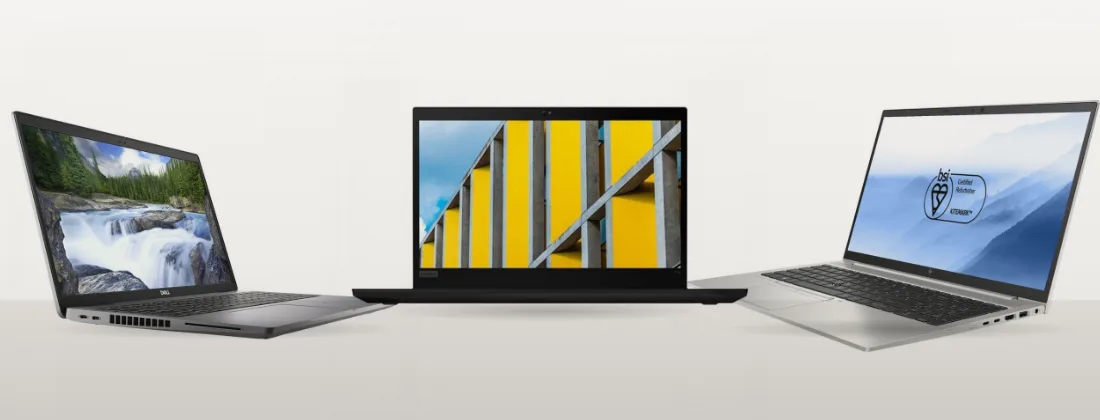
A refurbished business laptop is usually the best value way to get a solid Windows 11 laptop for less than new. Dell Latitude, Lenovo ThinkPad and HP EliteBook models were built for companies that keep a laptop for years, so they have tougher cases, better keyboards and more ports than most cheap consumer laptops at the same price.
The catch is that you are buying a used machine, so a few details matter far more than the brand name: the processor generation, how much memory it has and whether that memory can be upgraded, the health of the battery, the warranty, and who actually refurbished it. Get those right and a three or four year old business laptop will comfortably handle email, browsing, Office, video calls and schoolwork for years.
Our rule of thumb: Intel 11th generation or newer, 16GB of memory, an SSD, a battery that still holds at least 70% of its original capacity, and a written warranty of at least 12 months. Anything that misses two or more of those should be noticeably cheaper.
What "refurbished business laptop" actually means
Most refurbished business laptops start life on a company lease or in a large organisation's fleet. When the lease ends, usually after three to four years, the laptops are collected in batches, their data is securely wiped, and they are sold on to refurbishers. That is why you see so many of the same models, such as the Latitude 5420 or ThinkPad T14, on the second-hand market at the same time.
A proper refurbishment is more than a wipe and a clean. A good refurbisher will typically:
- test the main components, including the screen, keyboard, ports, webcam, speakers and battery;
- replace or repair anything that fails, such as a worn keyboard or a weak battery;
- clean or refinish the case, which can range from a wipe down to fully repainting the lid and base;
- install a fresh, licensed copy of Windows with the correct product key;
- grade the cosmetic condition so you know what it will look like when it arrives.
"Refurbished" is not a protected word, so the quality varies a lot between sellers. A laptop listed as "used, tested" on an auction site has usually had far less done to it than one from a specialist refurbisher, and it rarely comes with a meaningful warranty. That is the single biggest difference you are paying for.
Why a business model rather than a cheap new laptop?
At around the same price, a new budget consumer laptop and a three year old business laptop are very different machines. In our repair workshop we see a lot of both, and the differences are consistent.
What business laptops do better
- Build quality. Latitudes, ThinkPads and EliteBooks use stiffer chassis and stronger hinges because companies cannot afford them failing in the field.
- Keyboards. They are generally more comfortable to type on for long periods, and many models have spill-resistant designs and backlighting.
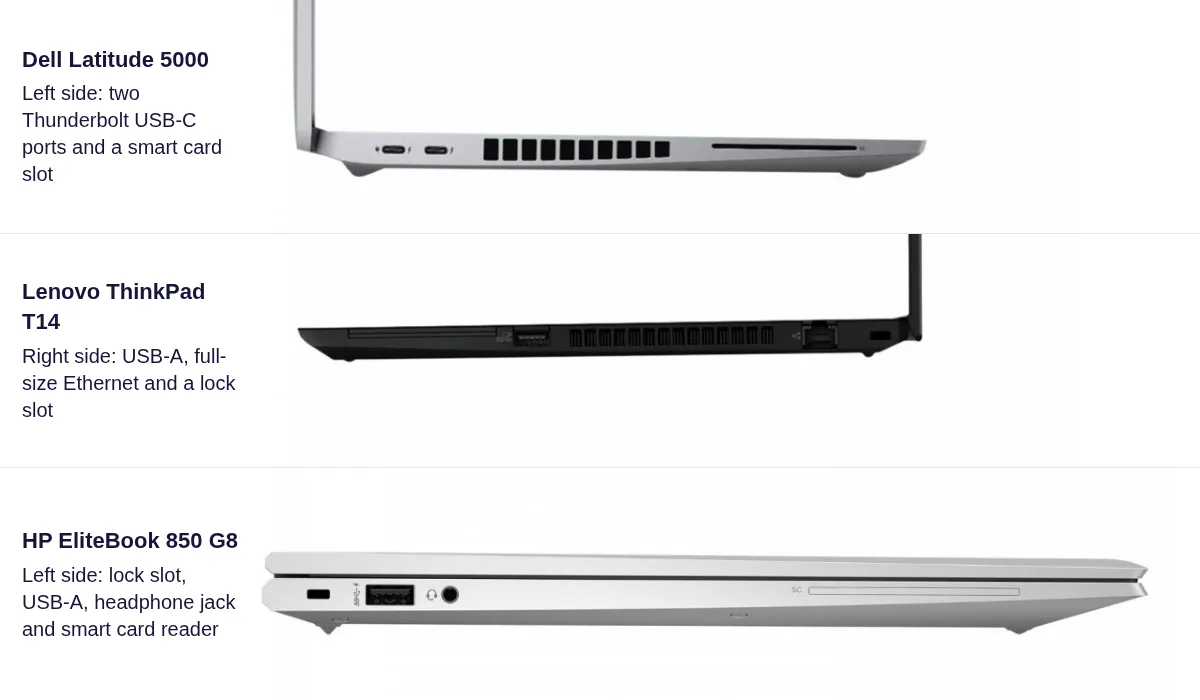
- Ports. You usually get USB-C that can charge the laptop and drive a monitor, full-size USB-A, HDMI, and on many models Ethernet and a smart card reader. No dongles needed for most people.
- Repairability. Batteries, SSDs, keyboards and, on many models, memory can be replaced. Spare parts are widely available because so many were made.
- Windows Pro and long driver support. Most come with Windows 11 Pro, and the manufacturers publish BIOS and driver updates for years.
Where they fall short
- The battery is used. Even a healthy refurbished battery will not match a brand new one. More on this below.
- Screens can be basic. Many business models shipped with Full HD panels that are fine indoors but not especially bright. Check the screen spec if you work near a window or outdoors.
- Webcams are often 720p. Fine for Teams and Zoom calls, but not as sharp as a new laptop's camera.
- No gaming. These use integrated graphics. They are excellent for work and study, not for modern games.
The processor generation matters more than i5 or i7
The most common mistake we see is paying extra for an "i7" when the generation is the thing that really decides how long the laptop will last. An 11th generation Core i5 is a better buy than an 8th generation Core i7 for almost everyone.
You can read the generation from the processor model number. The first digits after the dash tell you: an i5-8365U is 8th generation, an i5-10210U is 10th, an i5-1135G7 is 11th and an i5-1235U is 12th.
| Intel generation | Example chips in business laptops | Laptops on sale from | Windows 11 | Our view |
|---|---|---|---|---|
| 7th and older | i5-7300U | 2017 | Not supported | Avoid. No official Windows 11 support. |
| 8th | i5-8365U, i7-8565U | 2018 to 2019 | Supported | Works, but it is the oldest supported generation. Only worth it at a clearly lower price. |
| 10th | i5-10210U, i7-10610U | 2019 to 2020 | Supported | Fine for everyday use. Check the price against 11th gen. |
| 11th | i5-1135G7, i5-1145G7, i7-1185G7 | 2020 to 2021 | Supported | Our recommended starting point. Much better integrated graphics and USB4 or Thunderbolt 4 on many models. |
| 12th | i5-1235U, i7-1265U | 2022 | Supported | Faster again, with more cores. Worth it if the price gap is small. |
All of the Intel generations from 8th onwards are on Microsoft's list of processors supported by Windows 11. In early 2025 there was some confusion when 8th, 9th and 10th generation chips were briefly missing from a list Microsoft publishes for manufacturers building new PCs. Microsoft confirmed those chips are still supported on existing laptops. Windows 10 itself reached end of support on 14 October 2025, so do not buy a laptop that can only run Windows 10.
Memory and storage: 16GB, and check if it is soldered
For Windows 11 with a browser, Office and a video call open at the same time, 8GB is the bare minimum and 16GB is what we recommend. The question that catches people out is whether the memory can be upgraded later, because on some business models part or all of it is soldered to the motherboard.
This is what the listings for the models in our shop say:
| Model family | Memory slots | What that means for you |
|---|---|---|
| Dell Latitude 5400, 5410, 5420, 5430, 5520 | 2 slots | Easy to upgrade later, up to the maximum the model supports. |
| Dell Latitude 7410 | 2 slots | Upgradeable, like the 5000 series. |
| Dell Latitude 7420 | None (soldered) | What you buy is what you keep. Buy 16GB. |
| Lenovo ThinkPad T14 Gen 1 and Gen 3, T15 Gen 1 | 1 slot plus soldered memory | Part of the memory is fixed. You can add a stick to the one slot. |
| Lenovo ThinkPad T15 Gen 2 | 2 slots | Upgradeable. |
| HP EliteBook 840 and 850 (G6 to G8), 860 G9 | 2 slots | Upgradeable. |
Storage is simpler. Every laptop worth buying in 2026 has an SSD, and all of these models use an M.2 SSD that can be swapped for a bigger one. 256GB is enough if you keep most of your files in OneDrive or Google Drive. If you store a lot of photos locally, look for 512GB.
Battery health: what "at least 70%" really means
A laptop battery slowly loses capacity with every charge cycle. A refurbished laptop's battery will never be as good as new, so what you want to know is how much of its original capacity it still has. The refurbisher of the laptops currently in our shop states that every battery holds at least 70% of its original capacity, which is a sensible minimum. Below that, you tend to notice it running down during a working day.
Windows can tell you the exact figure, so you can check any laptop yourself, including one you already own:
- Click Start, type cmd and open Command Prompt.
- Type powercfg /batteryreport and press Enter.
- Windows saves a file called battery-report.html, usually in your user folder. Open it in your browser.
- Under "Installed batteries", compare the Design capacity with the Full charge capacity.
Divide the full charge capacity by the design capacity to get the battery's health. Here is what that looks like with example figures:
Full charge capacity divided by design capacity gives the battery health.
Example figures to show how to read the report, not a measurement of a specific laptop.
The same report lists the cycle count on most laptops. A few hundred cycles is normal for an ex-business machine. A battery is a consumable part, so check what the warranty says about it before you buy.
Screen, ports, keyboard and weight
Once the processor, memory and battery are right, the rest comes down to how you will use it.
- Screen size. 14 inch models (Latitude 5420, ThinkPad T14, EliteBook 840) are the best balance for carrying around. 15.6 inch models (Latitude 5520, ThinkPad T15, EliteBook 850) have a bigger screen and usually a number pad, but are heavier.
- Resolution. Make sure it says Full HD or 1920 x 1080. Some older business laptops shipped with 1366 x 768 screens, which look grainy today.
- Ports. If you want to plug into a monitor with one cable, look for USB-C with charging and display support, or Thunderbolt. If you work from an office, Ethernet and a smart card reader can be useful.
- Keyboard layout. Check it is a UK layout, with the large Enter key and the £ sign on the 3 key. Ex-lease laptops occasionally come from other countries.
- Weight. Most 14 inch business laptops weigh roughly 1.3 to 1.6kg. If you will carry it every day, the lighter 7000 series Latitudes and the EliteBook 840 are worth a look.
Grades and warranty: read the small print
Refurbished laptops are graded on how they look, not on whether they work. Each refurbisher uses its own grading, but broadly an A grade has very light signs of use, a B grade has visible light scratches and a C grade has more noticeable marks and should be cheaper. Our grading guide explains how we grade devices and how supplier grades can differ.
The warranty matters more than the grade. Check three things:
- How long. 12 months is a good standard for a refurbished laptop. Some sellers offer 30 or 90 days, which is not much protection.
- What is covered. Some warranties exclude the battery. Ask if it is not clear.
- How it works. "Return to base" means you send the laptop back for repair. Find out who pays the postage and how long repairs take.
The refurbished laptops in our shop at the moment come with a 1 Year Return To Base warranty, and like any online order you have 14 days from delivery to change your mind. They are all over £150, so delivery is free.
A checklist to use wherever you buy
Whether you buy from us or from anyone else, these are the questions worth asking before you pay:
- Which exact processor is it? Is it 11th generation or newer, or priced to reflect an older chip?
- How much memory does it have, and is any of it soldered?
- Is the storage an SSD, and how big?
- What is the battery health as a percentage, or what minimum does the seller guarantee?
- Is the screen Full HD?
- Is it a UK keyboard layout?
- Does it come with a licensed copy of Windows 11, and Home or Pro?
- What grade is it, and are there photos or a description of any marks?
- How long is the warranty, does it cover the battery, and how do repairs work?
- What is the total price including delivery?
Which one suits you?
| You need it for | Look for | Good model families |
|---|---|---|
| School, college or university | 14 inch, 11th gen i5, 16GB, good battery | Latitude 5420, ThinkPad T14, EliteBook 840 G8 |
| A parent or grandparent who wants it simple | 15.6 inch for a bigger screen and keyboard, Full HD | Latitude 5520, EliteBook 850, ThinkPad T15 |
| Working from home with a monitor | USB-C or Thunderbolt with display and charging, 16GB | Latitude 5420 or 5430, ThinkPad T14 Gen 3 |
| Carrying it every day | Lighter 14 inch, long battery life | Latitude 7410 or 7420, EliteBook 840 |
| A small business team | Windows 11 Pro, matching models, smart card reader if you use one | Any of the above in a batch of the same model |
If you are replacing an older laptop, it is worth finding out what it is worth first. We buy laptops, including faulty ones, through Sell Your Device, so you can put the money towards the next one. And if your current laptop is only slow, a new SSD or more memory might be all it needs: our laptop repair team can tell you honestly whether an upgrade is worth it.
You can see every model we have in stock, with its full specification and delivered price, in our refurbished laptops section.
Frequently asked questions
Is a refurbished laptop as good as new?
Not quite, and anyone who says otherwise is overselling it. The battery and the case have been used. But a well refurbished business laptop is fully working, has been tested, and will often outlast a new budget laptop because it was built to a higher standard in the first place.
How long will a refurbished business laptop last?
With an 11th generation or newer processor and 16GB of memory, you can reasonably expect several years of everyday use. The part most likely to need replacing first is the battery, which is a routine repair on these models.
Is an i7 worth paying extra for?
Usually not for everyday use. A newer generation i5 makes more difference than an older i7. Pay for the i7 only if you run heavier software, or if the price gap is small.
Can I run Windows 11 on a refurbished laptop?
Yes, as long as it has an Intel 8th generation or newer processor (or a supported AMD Ryzen) and a TPM 2.0 chip, which all of these business models have. Check that it comes with a licensed copy installed.
Are refurbished laptops safe to buy, given they belonged to someone else?
From a reputable refurbisher, yes. The drives are securely wiped and Windows is reinstalled from scratch before the laptop is sold. Avoid listings that still show the previous owner's account or ask you to "reset it yourself".